Four agents, one repo,
nobody collides.

A desktop workspace for Claude Code. Every task gets its own git worktree, so several agents can be mid-edit on the same repository without touching each other's files.

Free and MIT. Your machine, your subscription or key, no account, no telemetry.

The actual application, running here on sample data, not a video and not a mock. Pick a chapter below, or click in and drive it yourself.

Every chapter switches GROUP: a set of tabs you live in. Click in to drive it yourself.

2,691 commits428 in the last 7 days78 releasesv2.2.11on macOS, Windows and LinuxMIT licence

Counted from the public repository when this page was built. First commit 11 February 2026.Check them yourself.

the whole idea

Three things, and you know the app.

There is no new workflow to learn. The agents are the ones you already run, in a terminal, on your own account.

1

A topic is a session with a workspace attached

One conversation, and the things it needs: a terminal, a branch, a browser, the files it touched. Close the app and it comes back the same, scrollback included.

2

Panes and groups are the room they live in

Split any pane, drag tabs between groups, keep three whole projects open beside each other. The layout persists, and syncs to your other machine.

3

The board is where you hand work over

Write a task, an agent takes it in a git worktree of its own, and hands back a commit and evidence. You read the diff and decide.

Runs the agents you already run

Claude Code · Codex · OpenCode · Gemini CLI · Anthropic API · OpenAI GPT · MCP · any ACP agent

the board

Give it a task. Walk away.

A worktree per agent is not ours alone any more: Devin Desktop sells the same idea. What is still unusual is the board: the agent picks the card up itself, works it, and brings it back with evidence.

  1. 1

    You write the task

    What should happen, where to look, how you will know it worked. Write it vaguely and it comes back vague.

  2. 2

    An agent picks it up

    It gets an isolated worktree on its own branch. Four agents can be mid-edit at the same time and none of them collide.

  3. 3

    It hands back evidence

    Committed work, a short summary, and a screenshot or clip of the thing running. Then it moves its own card to review.

  4. 4

    You decide

    Read the diff and approve. Landing it into main is a second click, and pushing is a third. None of them happen on their own.

Sessions start at full effort

Launched from a plain shell, Claude Code falls back to low effort. Topics passes --effort on every spawn, so a session opens at the top tier. Drop it per topic when the job is small and you would rather not pay for the deep thinking.

Sub-agents stay on screen

When an agent spawns a fleet of its own, the children appear in the session tree instead of disappearing into a pipe. You can see what each is doing and what it is spending while it does it.

Nothing lands behind your back

Approving accepts the work. Landing merges it locally. Publishing pushes. Three decisions, three clicks, because "done" should mean you said so.

one window, every surface

Everything a session needs, in the same window.

Each topic carries its own project, terminals and browser, and gets them back after a restart.

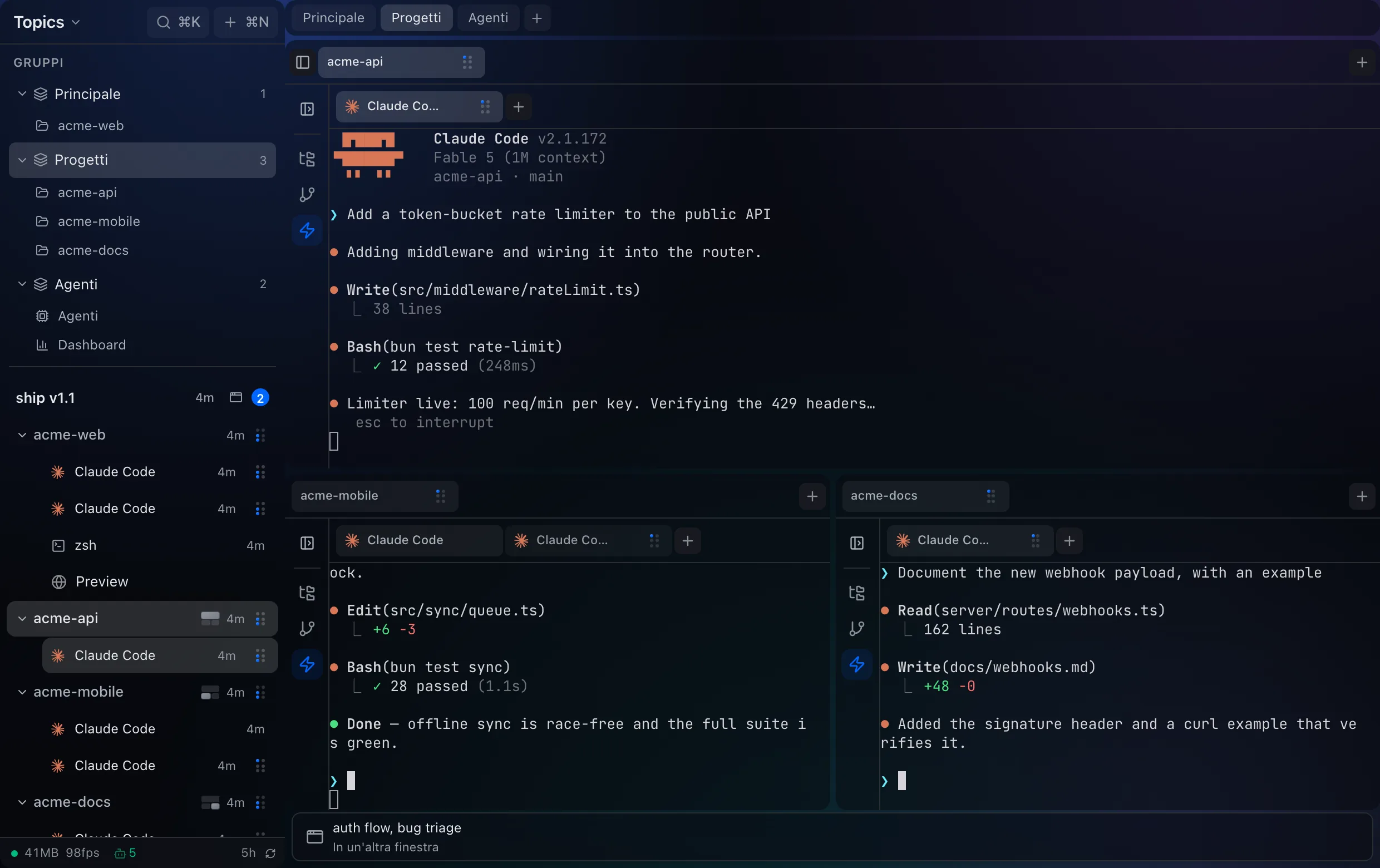
The Topics window showing the Progetti group: acme-api across the top, acme-mobile and acme-docs sharing the row below, each with its own Claude Code session.
The "Progetti" group: three projects open at once. The strip at the top switches groups; the sidebar lists what each one holds.

01 Organize

Structure that survives a restart, and a second machine.

  • Topics, not tabs. Group sessions by project or intent. Each one keeps its terminal, files and conversation.
  • Projects side by side. Several whole projects open at once in a grid you can resize.
  • Groups and splits. Split any pane, drag tabs between groups, tear one off into its own window.
  • Layout that persists. Panes, splits and tabs come back the way you left them.
  • Tab sync across devices. Open the workspace on another machine and find it in the same shape.
  • Command palette. Everything reachable from the keyboard, including reopening the tab you just closed.
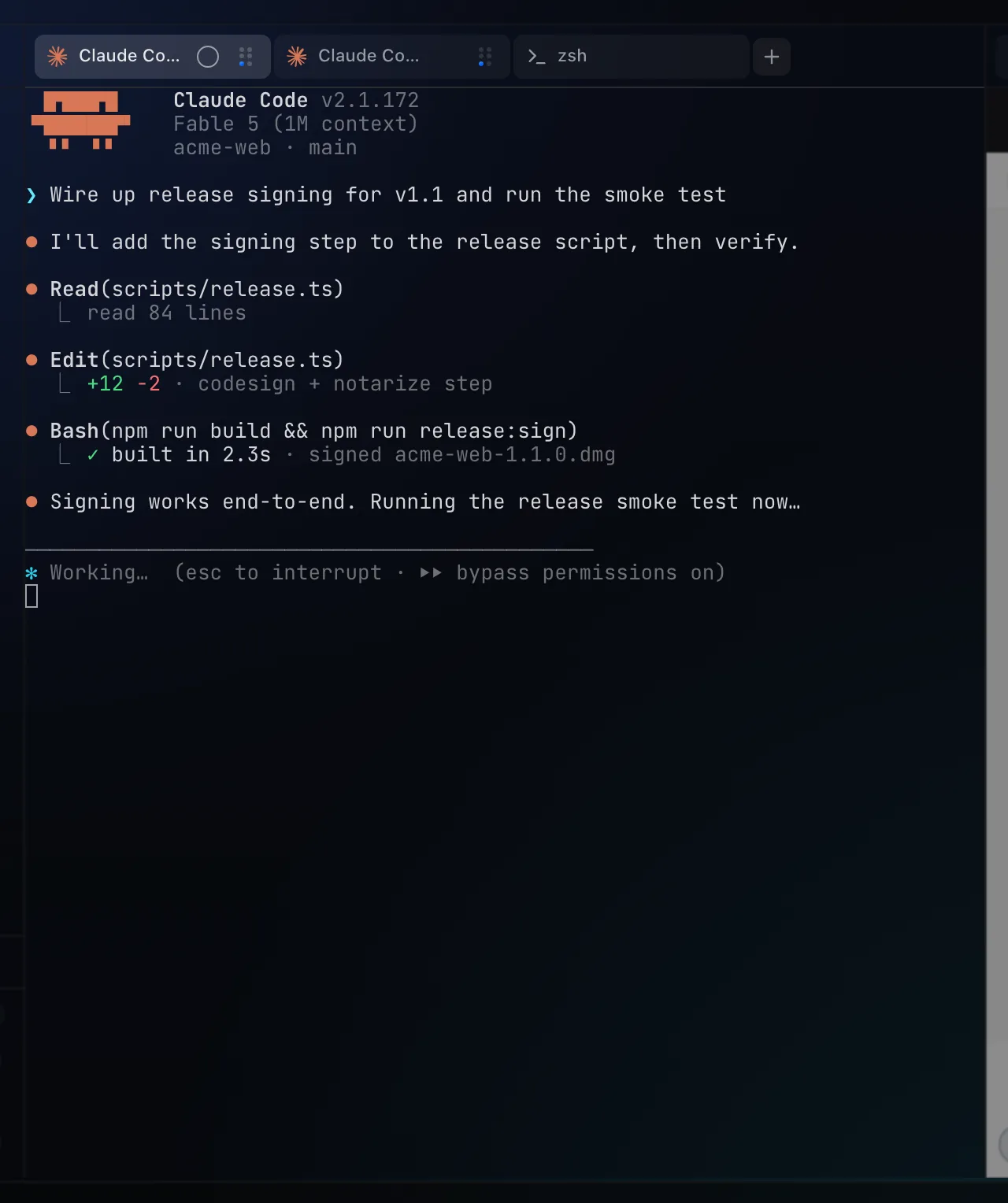
A pane holding a live Claude Code session mid-task, with its tab bar showing the second session next to it.
A Claude Code session in an embedded terminal: the same binary you run in a shell, with its scrollback kept.

02 Run

The agent, the dev server and the page it renders, all in reach.

  • Embedded terminals. Claude Code, Codex, OpenCode, Gemini CLI or a plain shell, running where you can watch them.
  • Lossless reattach. Reload the app or shut the laptop; the session is still there with its scrollback.
  • Browser pane. A real browser per topic for localhost and docs, and for letting an agent drive the page.
  • Processes and scripts. Start dev or test from the sidebar and keep their output.
  • Git worktrees. An isolated checkout per task, named for you and cleaned up afterwards.
  • Cron jobs and webhooks. Work that repeats, and work triggered from outside.
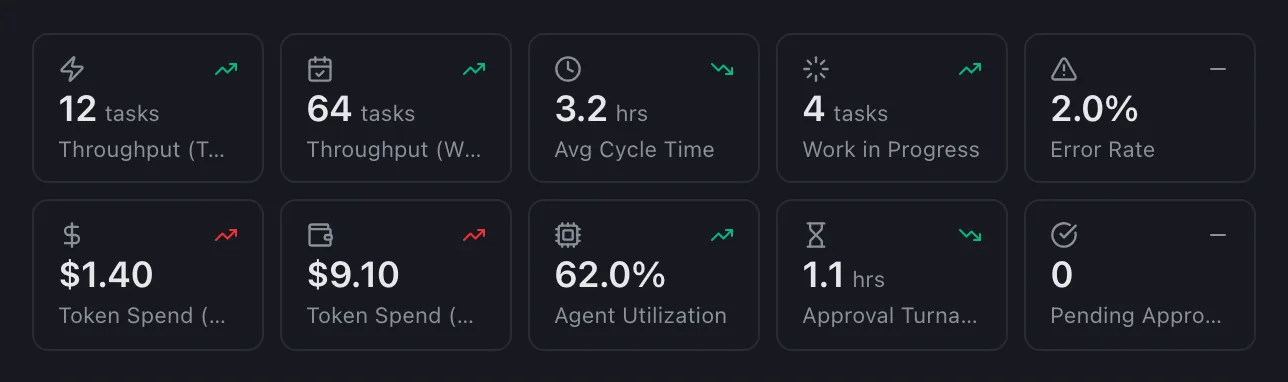
The dashboard's headline numbers: tasks shipped, cycle time, token spend and agent utilisation, each with its change against the previous period.
The numbers, at the size they are in the app. What the agents got through, and what the tokens cost.

03 See

What the agents are doing, and what they are costing you.

  • Agent monitoring. Every session's state at a glance, plus a native notification when one finishes or gets stuck on a question.
  • Heartbeats and history. A timeline per session, and a viewer to read back what happened.
  • Context inspector. See what is filling the window, switch sources off, edit the memory a topic carries.
  • Dashboard. Throughput, cycle time, token spend, and which agent got through the most work.
  • Per-pane resource usage. Which tab is eating your RAM, not just how much the app uses in total.
  • Activity feed and journal. A live stream of what happened, and a digest at the end of the day.
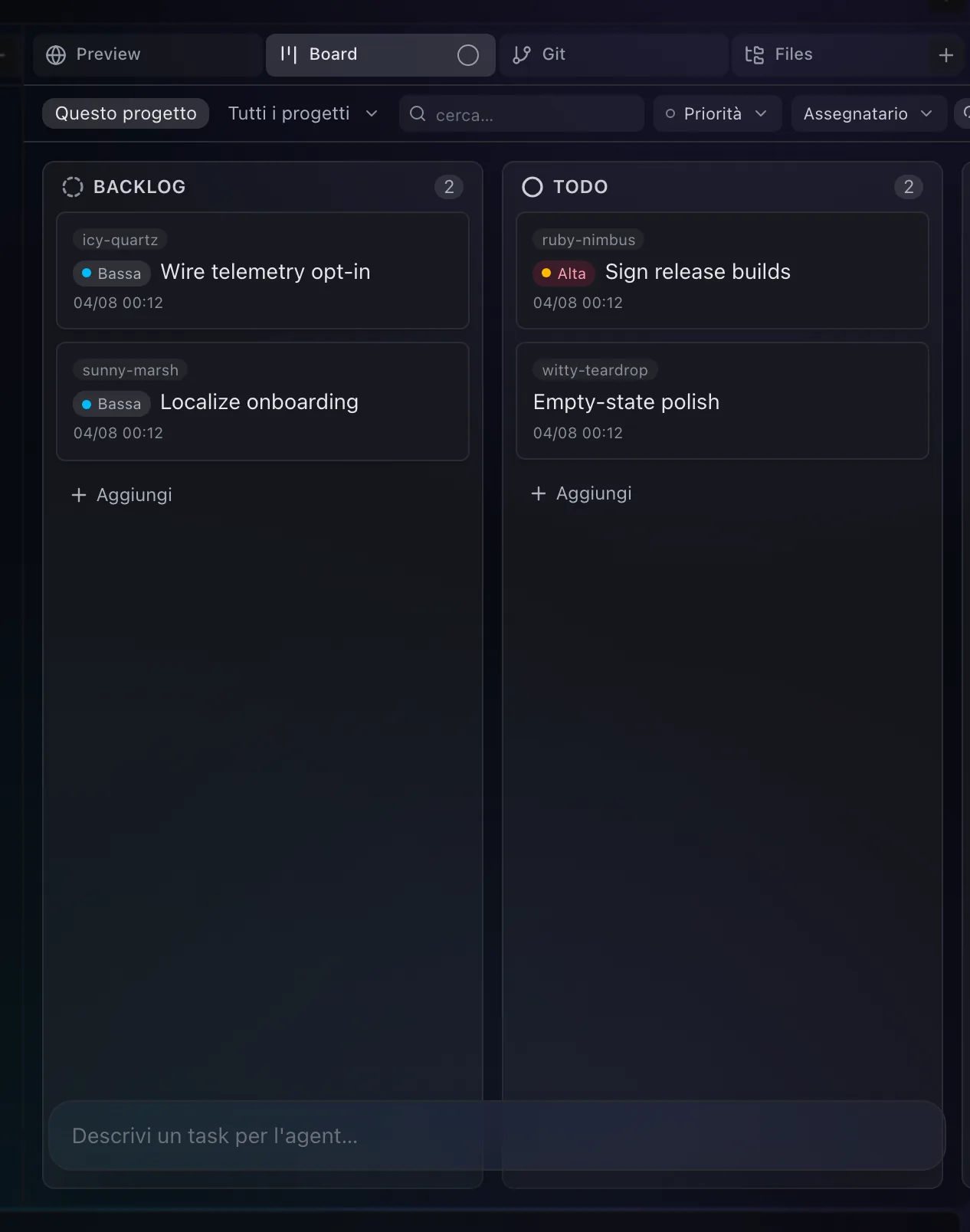
The board pane: Backlog, To do, In progress and Review columns, with an agent working a card in its own worktree.
A card an agent picked up. It works in its own worktree and moves itself to review when it has evidence.

04 Ship

From a card on a board to a commit on main.

  • Kanban board. Tasks, subtasks, priorities, tags and dependencies, moved by dragging.
  • Agent dispatch. Assign a card to an agent and it starts working, in a worktree of its own.
  • Approval gates. Delivery evidence attached to the card, and a reject that sends the agent back with your notes.
  • Diff review. Read the change in the app before you accept it.
  • Files and editor. Tree, search, syntax highlighting, and git status next to the filenames.
  • Land, then publish. Merge locally when you are ready. Pushing stays a separate decision.
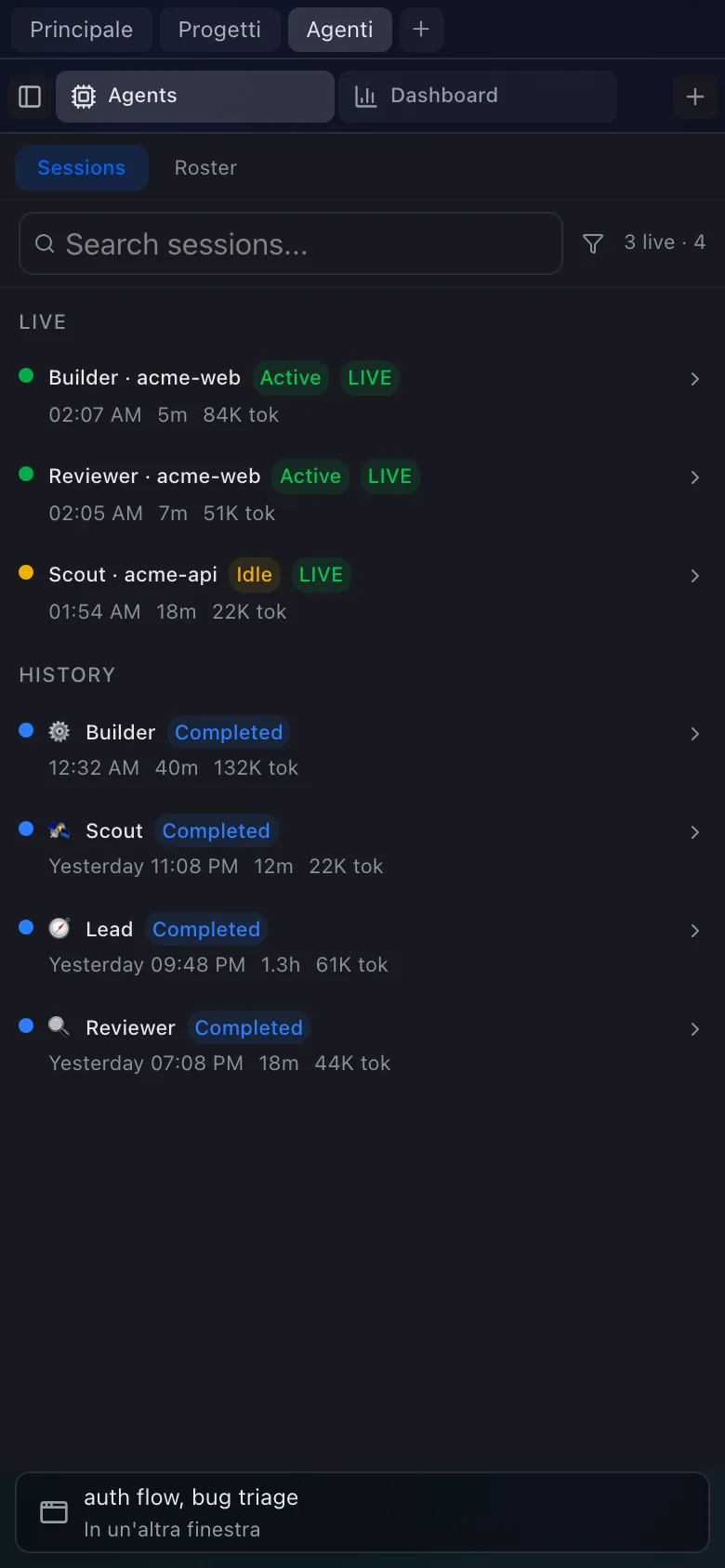
The whole app at phone width, listing the agent sessions running on acme-web.
Not a mock frame: the same client at a 390pt viewport, listing the sessions running at home.

05 Reach

The same workspace, from somewhere that is not your desk.

  • Mobile and PWA. Check on a running agent from your phone.
  • Remote access. Reach the workspace over a tunnel you run, with your own auth in front of it.
  • Remote browser. Watch and drive the agent's browser from another device.
  • Cross-device sync. Open the workspace on a second machine and find the same tabs and layout.
  • A view of every machine. Which of your machines is online, and what is running on it.

All of this is in the free app and works over a tunnel you run today. There is no hosted version and none is running. See the limits.

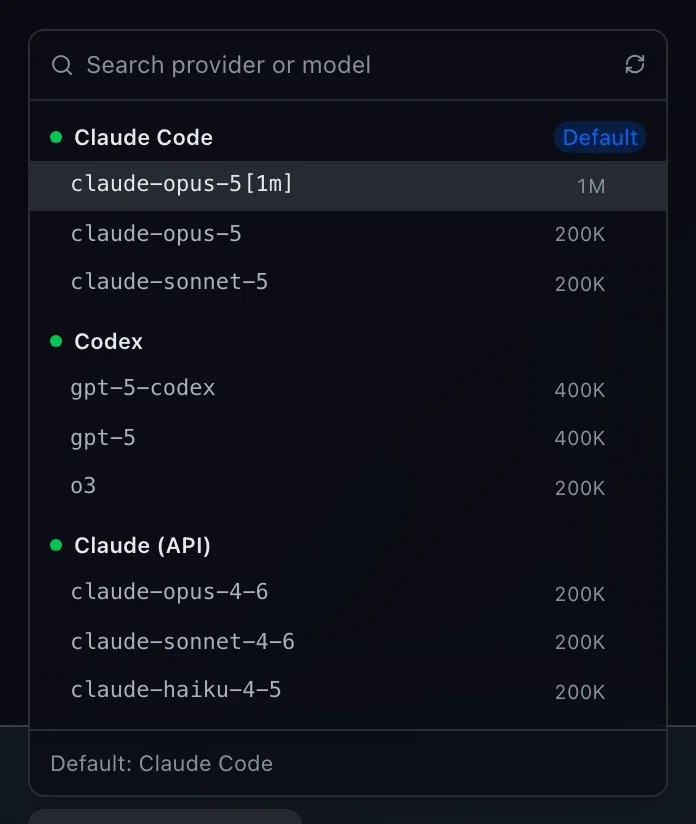
The provider and model picker: Claude Code, Codex and the Anthropic API, each with the models it can run.
Pick the provider per topic. The bill stays between you and them, and we never sit in the middle.

06 Own

Your machine, your account, your data.

  • MIT licensed. Read it, fork it, ship it.
  • Local first. Conversations and project data sit on your disk.
  • No telemetry. Nothing phones home.
  • Your key or your subscription. Point it at an Anthropic or OpenAI API key, or run the CLI you already sign in to and keep using the plan you pay for.
  • MCP built in. The same tools your agents already use.
  • A native shell. A small desktop app, not a browser wearing a costume.
against the alternatives

The line that actually separates these.

Not features, which move in a release. Where the work runs, and who else can read it.

QuestionTopicsConductorDevin DesktopZed
Where the work runsYour machine. No server of ours in the path.Local, or their cloud, where chat messages are stored on their servers."Fleets of local and cloud agents."Your machine.
Price$0 for the whole appFree $0 · Pro $50/mo · Teams $60/mo/userNot stated on the product pagePersonal $0 forever · Pro $10/mo · Business $30/seat/mo
LicenceMIT, open sourceNot statedNot statedOpen source
Account requiredNoneRequired for the paid plansSign-up requiredNot for the free plan

Every cell about a product other than ours is quoted from their own public page, read 4 August 2026. The full table, six tools, and when each of them is the better answer →

before you download it

When Topics is the wrong tool.

Written by the people who make it, which is the only reason it is worth reading.

You run one agent at a time

Start a session, watch it, finish. A workspace is overhead. Everything here is in service of the case where three or four are running and you have lost track of which one is waiting on you.

You want work to continue after you close the lid

It will not. The agents run on your machine, so they stop when it sleeps. If that is the requirement, a product with cloud workspaces is the right shape and we say which ones on the comparison page.

You wanted an editor

Topics is not an IDE and is not becoming one. It hosts the terminal agents and the surfaces around them; you keep whatever editor you already use, open beside it or inside a pane.

You need accounts, roles or a shared board

There is no authentication layer at all. Not a weak one: none. Boards sync between your machines. Exposing one over a tunnel means putting your own auth in front of it.

macOS will say the developer cannot be verified

The build is signed ad-hoc, so Gatekeeper stops it on first launch and since Sequoia the control-click bypass is gone. The three steps are below, and if that is a dealbreaker it is a fair one.

It is young, and macOS gets the most use

First commit 11 February 2026. Windows and Linux are built and released every time, and are used far less than macOS, which is exactly where you should expect to find the rough edges.

also in the box

And a long tail of things you only miss once.

All of it shipped, all of it free, none of it worth its own headline.

Checkpoints Roll a conversation back to any point, and the working tree with it.
Night mode The board only dispatches while the machine is idle, and stops when you come back.
Auto-merge Opt in per board and an approved task lands itself, unless the merge conflicts.
Voice Speak to an agent and hear it answer. Transcription runs locally through Whisper.
Tab permalinks Copy a link to any tab. Opening it focuses that exact pane, on any device.
Slash commands Yours and the project's, plus @ mentions for files and topics.
Model per task Big tasks get the strong model, small ones do not, and you set the rule.
Pre-review checks Commands that must pass in the worktree before a task may ask for review.
Topic goals A standing objective re-sent every turn, which survives a compaction.
Outside sessions Claude Code running in your own terminal still shows up here.
Dispatch capacity Concurrency sized to the machine, so eight agents do not thrash one laptop.
Prompt caching The stable prefix is marked cacheable, which is most of what you were paying twice for.
Typed questions When an agent asks something, you get a real form instead of guessing the syntax.
Conversation branches Edit an earlier message and continue from there without losing the original.
Agent profiles Name them, give them a model and a concurrency, assign them work.
Two languages The interface speaks English and Italian.
why topics

Not another editor wrapped around a model.

Cursor and Warp rebuilt the editor. Topics did not. It is a home for the terminal agents you already trust, where you can see what they are doing and step in when they need you. You keep the workflow you have. It gets a window worth looking at.

Open sourceMIT, on GitHub
Local firstno cloud, no telemetry
Any agentyour CLI, your account
pricing

The app is €0 and stays €0.

Everything that runs on your machine is free under MIT, permanently: every agent, every terminal, the whole board. What you can pay for is support, an invoice, and a say in what gets built, never a feature held back from the free app.

€0 forever

€0the whole product

Not a trial and not a tier. This is the app.

  • Unlimited topics, projects, panes and terminals
  • Board, agent dispatch, worktrees, diff review
  • Dashboard, monitoring, context inspector
  • Remote access and mobile over your own tunnel
  • Your subscription or your key. We are never in the path
  • No telemetry, no account, data on your disk
Download Topics

MIT. No sign-up, no email, nothing to cancel.

Supporter

€5/ month, or €49 a year

You use it daily and would rather it kept being made.

  • No features attached. That is the point
  • A private channel with the person building it
  • Your issues looked at first
  • A vote on what gets built next
  • Your name in the credits, if you want it there
Support the project

Cancel whenever. Nothing in the app changes either way.

Best value

Founding

€99once, not a subscription

Everything Supporter gives, plus the hosted side when it exists.

  • Everything in Supporter, for good
  • Any future hosted plan, free for life
  • Early builds before they are tagged
  • Refunded in full if nothing hosted ships within a year
Become a founding user

Nothing hosted exists today. You are buying a promise with a refund attached to it, and you should read that as exactly what it is.

Commercial

€490/ year, per company

Your finance department needs a counterparty, not a GitHub repo.

  • A proper invoice, PO and VAT number
  • Named contact, two working days to a reply
  • Help getting it running on your setup
  • Your bugs prioritised over the queue
  • The licence stays MIT. You are paying for the relationship, not permission
Request an invoice

Unlimited seats. There is no per-seat count to police because there are no accounts.

Is there lock-in?

No, and the shape of the product is the answer rather than the promise. Your data is SQLite and files on your own disk, the licence is MIT, and there is no account to close. Stop paying, or delete this page from your history, and the app carries on exactly as before.

Do I pay you for tokens?

Never. Topics talks to Anthropic or OpenAI with your key, or through the CLI you are already signed in to, and that bill stays between you and them. We do not resell inference or take a cut of it.

Will the free app get worse to make me pay?

It cannot without a fork appearing the same week, which is what MIT is for. Nothing in the paid tiers is a capability withheld from the app. Read the lists again and notice that not one of them is a feature.

And if you would rather not pay us at all?

Then do it yourself, and here is how. Remote access is a cloudflared or tailscale tunnel with your own auth in front. Push notifications are ntfy. Off-machine backup is rclone or restic pointed at ~/.topics. All of it works today with the free app, and saying so out loud is the only thing that makes the sentence above it believable.

changelog

What's new.

Every release, and what changed in it. Full changelog →

v2.2.11

New

  • timing sidebar and tabs say how long it has been working, or how long since it finished
  • costs stores the MODEL per message and repairs history that was inflated 3x
  • tab every tab has its own permalink /tab/<type>/<key>, copyable and resolvable
  • chat native AskUserQuestion panel over the MCP bridge
  • browser import_chrome now reads from Dia, Arc and Chromium too

Fixes

  • notifications on every launch the app re-announced every chat that had already finished
  • costs prices were stuck on retired models, and the bill came out three times too high
  • perf SessionActivity subscribed to the clock even for idle rows
  • dashboard stop adding up costs we know are wrong as if they were money
  • badge in split view it vanished from the cell you were NOT looking at as well
  • observability a model with no price, and a refused park, are now visible
  • board on mobile, no card text below 12px
  • board responsive top bar on mobile, and no more double scrollbar on the columns
  • board a column keeps ONE scrollbar (standard thin) and no longer blanks the indicator
  • layout one identity per pane, and a broken pane no longer takes the window down
  • ask-user the panel survives a human getting up from the desk
  • ask-user replaces the short-legged long-poll: the socket cannot hold through idle minutes
  • topics don't report open-project/create-project as ok when bind fails

v2.2.10

Fixes

  • release macOS ships LibreSSL as openssl, and it does not know `-legacy`

v2.2.9

Fixes

  • release macOS signing needs TRUST as well, not just the key
get topics

Download for your machine.

Free, open source, ready to run.

macOS will say the developer cannot be verified

Topics is signed ad-hoc rather than with a paid Apple Developer certificate, so the first launch is blocked. Since macOS Sequoia the old control-click trick no longer works: Settings is the only route, and it takes about fifteen seconds:

  1. Open the app once and dismiss the dialog that says "Apple could not verify Topics is free of malware".
  2. Go to System Settings → Privacy & Security and scroll to the bottom.
  3. Next to "Topics was blocked to protect your Mac", press Open Anyway and confirm.

You only do it once. If you would rather check first, the build is reproducible from the tag and every asset has a .sig beside it on the releases page.

Or let your agent install it

There is a machine-readable page at /agents.md with the install steps, the ports and the MCP surface. Paste this into any coding agent:

Read https://topics.armonia.io/agents.md and install Topics on this machine

Every asset and checksum lives on the releases page.